Student Manual FeedPulse
Last updated: July 11, 2026

Summary
You are going to start using FeedPulse! FeedPulse is a learning tool and has been developed to monitor your learning process. FeedPulse supports you in getting more insight into your own development and performance over the time span of an entire course. The teacher regularly gives you oral feedback and you will register the feedback in a checkpoint - meaning a feedback moment - in FeedPulse yourself. FeedPulse ensures that you actively process the feedback you receive from teachers, coaches or other students.
The tool FeedPulse
We would like to explain several elements of FeedPulse.
Checkpoints
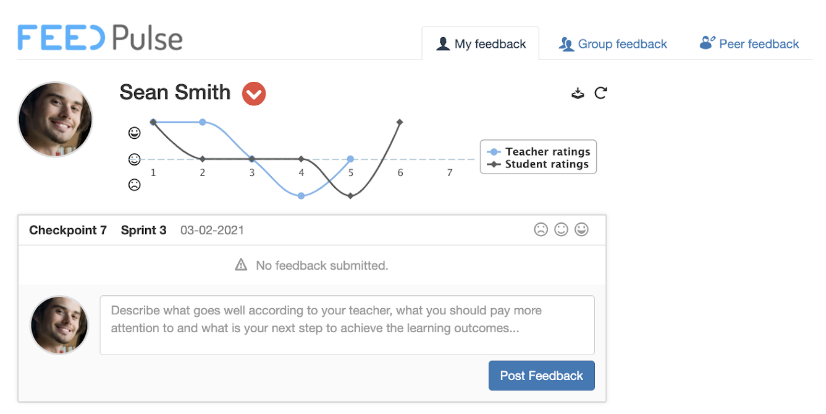
A checkpoint represents a feedback moment. The teacher (or student) creates a checkpoint for an individual student or for a group of students, as shown in Figure 1. After you received oral feedback from the teacher, you can write this feedback down in the checkpoint.
Consider these guiding questions when filling in the checkpoint:
What went well according to the teacher?
What could you pay more attention to according to the teacher?
What is your next step towards achieving the learning goals / learning outcomes?
Smiley-rating for students (optional feature)
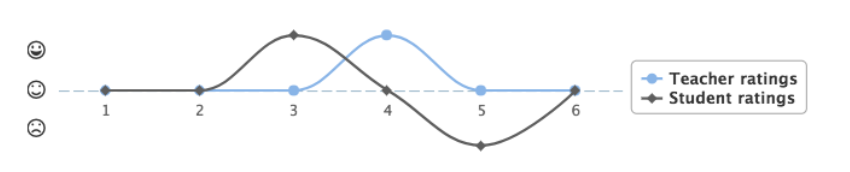
The teacher gives a rating of the overall performance of the student (compared to the learning outcomes) at each checkpoint. The rating can be a neutral, positive or negative smiley, as depicted in Figure 2. The smiley-rating feature for students can be enabled by the teacher. By giving yourself a smiley-rating you are encouraged to think about your own development. In case differences occur between the student-rating and teacher-rating, these differences can be used as a starting point for the conversation during the feedback moment.
Tabs in FeedPulse
Three tabs can be enabled in FeedPulse by your teacher: My feedback, Group feedback and Peer feedback. All your checkpoints will be displayed in the My Feedback tab. You enter your individual feedback here. Another tab is Group feedback. Via this tab you can process the obtained group feedback, which you have received as a project group. One group member registers the received feedback and every other group member can respond once (for example with an addition). The last tab in FeedPulse is Peer feedback. Here you can enter feedback about yourself and your other group members. The feedback of your peers is only shown after you have delivered feedback to your peers yourself.

Download PDF
Teachers and students can download a PDF of all the checkpoints in FeedPulse. This can be used, for example, as input for a portfolio.
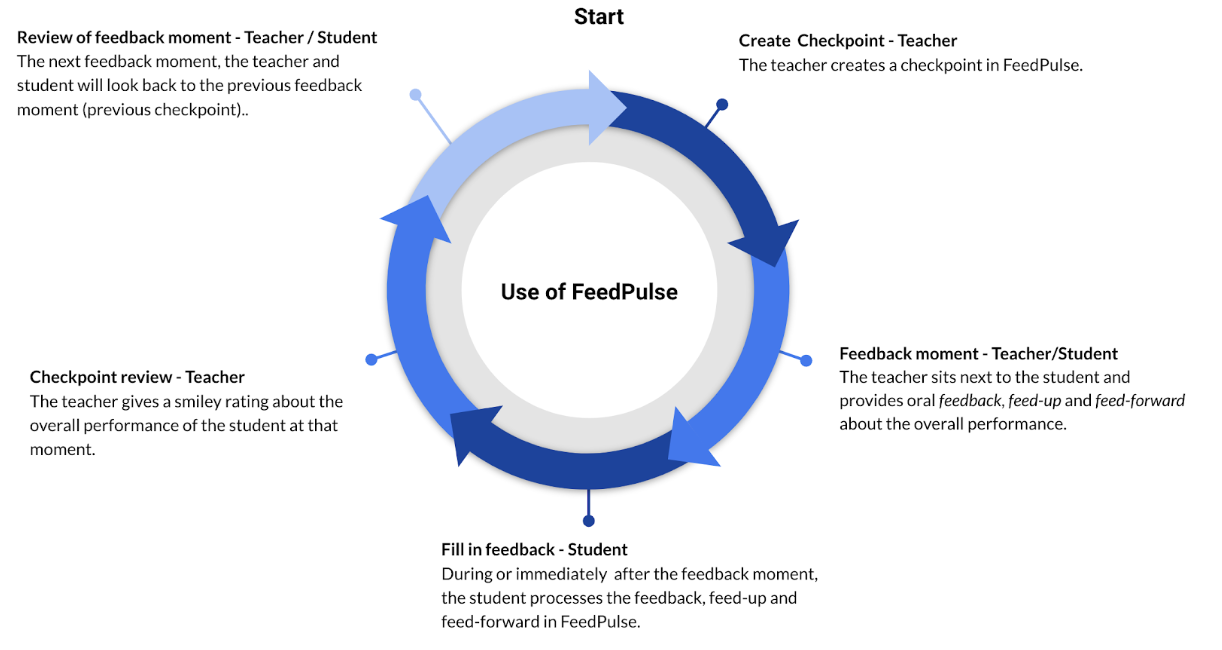
FeedPulse Workflow
Here the workflow is explained:
Resources
FeedPulse website: www.feedpulse.com
Feedpulse Testimonial
FeedPulse Testimonial - Assessment as learning from Drieam on Vimeo.
Questions? Feedback? Need some help?
We are here to support you. Please send us an e-mail via support@drieam.com.