Teacher Manual FeedPulse
Last updated: July 11, 2026

Summary
FeedPulse is a tool which can be used to bring the theory of Longitudinal testing (van der Vleuten, 2011) and Assessment as Learning (Dochy, Dochy & Janssens, 2018) to practise. These two theories provide insight into the way in which students are provided with feedback at multiple moments during their learning process. These different feedback moments are learning moments for the student (and lecturer) and can provide valuable information about the development. Students process the oral feedback they received from their teacher into FeedPulse themselves. This way, they are activated and become responsible for their learning process. Since the feedback of multiple measurements is tracked in FeedPulse, an overview of the development of a student over time arises. This not only makes it easier for the teacher to monitor the learning process of their students, the student also gains more insight into their growth.
Why FeedPulse?
Do you recognize the following? Students mostly make the greatest effort at the end of a semester. We would like the student to show linear learning behavior with evenly distributed effort, instead of a peak in knowledge reproduction at the end of a semester. In Figure 1, you see a representation of the study effort of the student compared to the time span of the course.
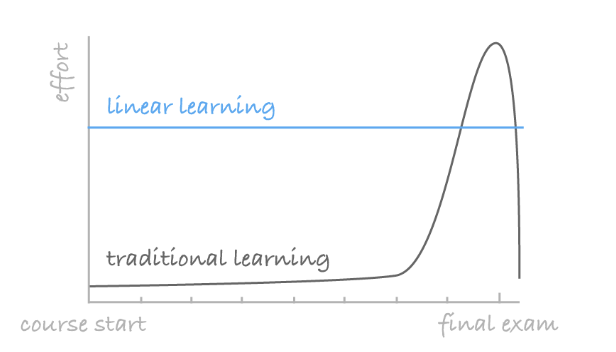
The black line represents the traditional way of learning, in which a test is taken at the end of the learning process. Just before the test, students learn what is necessary to pass the course. This way of assessing often results in a peak load towards the end of a course’s time span. There is a low sense of urgency until the very moment of assessment. That is why we would like to stimulate linear learning behaviour with more evenly distributed effort (as represented by the blue line in Figure 1).
Longitudinal testing
A best practice for establishing a more evenly distributed effort of learning among students is using several (formative) measurement moments. This is called longitudinal testing. During multiple moments, the student is provided with feedback about his current level of performance. By providing just-in-time feedback, feed-up and feed-forward (Hattie & Timperley, 2007), the teacher can stimulate the reduction of the gap between the current performance and the desired performance.
When using FeedPulse, students actively process the received oral feedback themselves in FeedPulse. This gives the feedback more meaning and makes sure the feedback is embedded in the learning process. FeedPulse provides an overview of a student's performance over time so that the student is constantly triggered to anticipate the provided feedback and improve his performance.
The various feedback moments can be considered learning moments (Assessment as Learning). In these various feedback moments, the student is given timely insight into his development (in relation to the learning outcomes). At the end of the course's time span, all feedback given, all products delivered and all reviews of course deliveries, can form the basis for the (integral) final assessment. The result of this final assessment should not really be a surprise to the student anymore!
The tool FeedPulse
We would like to explain several elements of FeedPulse.
Checkpoints
Each checkpoint represents a feedback moment. The teacher (or student) creates a checkpoint for a student or a group of students. The student writes down the received feedback in the checkpoint himself.
Students can consider these guiding questions when filling in the checkpoint: What went well according to the teacher? What could you pay more attention to according to the teacher? What is your next step towards achieving the learning goals / learning outcomes?
Smiley-rating
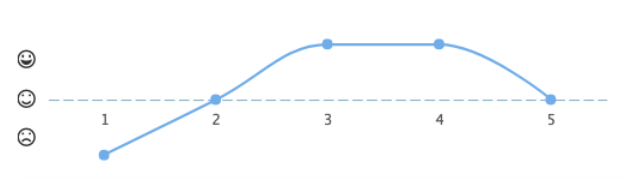
The teacher gives a rating of the student's overall performance (compared to the learning outcomes) at a checkpoint. The rating can be a neutral, positive or negative smiley, as depicted in Figure 2. These various intermediate "rough" ratings ultimately say more than a single final measurement.
Self-rating (optional)
The student can also give himself a rating at each checkpoint. This way students think about their own performance, are more involved in the feedback process and highly involved in their own development. The differences between the self-rating and the teacher-rating, as for example shown in Figure 3, can be valuable input and may function as starting points for conversations concerning the development of students.

Tabs in FeedPulse
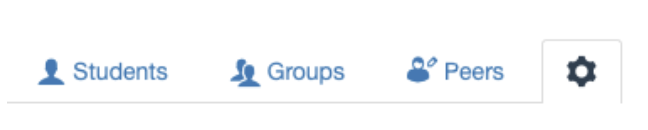
Three tabs can be enabled in FeedPulse by the teacher via the gear icon (the settings icon): Students, Groups and Peers. In the tab Students all students who are enrolled in the course will be displayed. Students archive their individual feedback here. Second, students can process the received group feedback via the tab Groups. One group member registers the received feedback and every other group member can respond once (for example with an addition). The last tab in FeedPulse is Peers. A group of students can enter feedback about themselves and about the other group members here.
Download PDF
Teachers and students can download a PDF of all the checkpoints in FeedPulse. This can be used, for example, as input for a portfolio.
Using FeedPulse
It is nice for students if all teachers who use FeedPulse apply this in the same way as much as possible, so that students get used to a uniform method. A common method is the following:
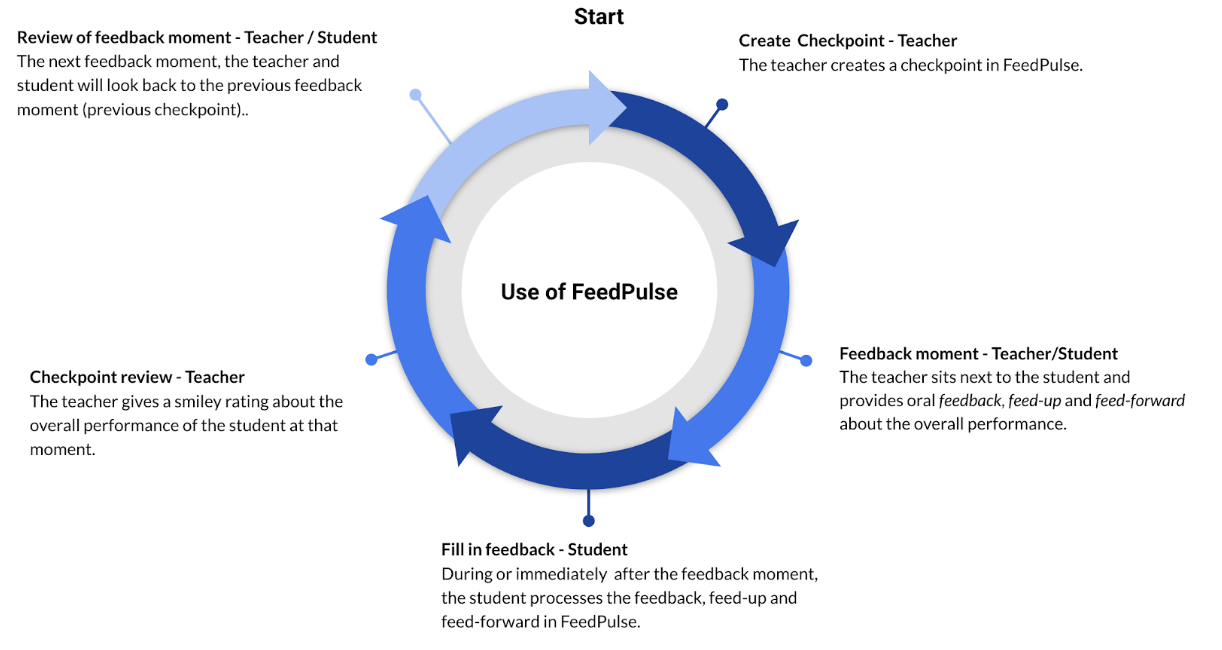
The teacher creates a checkpoint.
During the feedback moment (checkpoint), the teacher sits next to the student and provides oral feedback, feed-up and feed-forward about the overall performance.
During or immediately after the feedback moment, the student processes the feedback, feed-up and feed-forward in FeedPulse.
Immediately after this moment, the teacher gives a smiley rating about the overall performance of a student at that moment.
The next feedback moment (for example one or two weeks later), the teacher and student will look back to the previous feedback moment (previous checkpoint). How is the student performing at the moment? And has he taken action in response to the feedback and feed-forward from last time?
The teacher creates a new checkpoint and the student enters the feedback, feed-up and feed-forward in this new checkpoint.
FeedPulse Workflow
The most commonly used workflow in FeedPulse is explained below:
Resources
Feedpulse Testimonial
FeedPulse Testimonial - Assessment as learning from Drieam on Vimeo.
Questions? Feedback? Help needed?
We are here to support you. Please send us an e-mail via support@feedpulse.com.